Workflow and Best Practices
Conventional algorithms are designed to answer exactly one question. In contrast, deep models based on convolutional neural networks (CNNs) can be taught to "learn" patterns and be adapted to a wide variety of problems and tasks, such as denoising, super-resolution, and segmentation. Data, which is used to train a deep model to understand how to learn and apply concepts those concepts, are the most crucial aspect that makes training possible. As shown in the following flowchart, three different data sets — the training set, the validation set, and the testing set — are used for training, fine-tuning, and testing.
Deep learning workflow
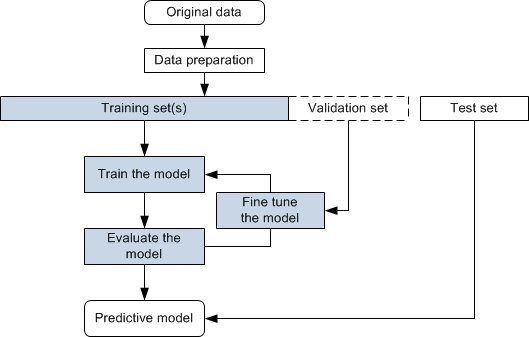
Training set… Is the portion of data used to train models. The model learns from this data to apply concepts such denoising, super-resolution, and semantic segmentation and to produce results. Training sets can include the training input(s) and output(s), as well as an optional mask(s). If training is going well, every iteration updates the weights of the network so it becomes better and better at predicting on the training set.
Test set… Is used only when the final model is completely trained to assess the performance of the final model.
Validation set… Is a subset of the training data that provides an unbiased evaluation of a model. Overfitting is checked and avoided with the validation set.
The following 'best practices' can help you get the most from your project:
-
Explore whether your project is better suited to classical machine learning or deep learning.
-
Make your data suitable for model training (see Data Preparation). For example, using calibrated datasets is recommended for developing 'universal' models.
-
The quality of your training sets will determine the performance of the predictive model. This means that you should have a strategy for continuous improvement of your training set, for as long as there’s any benefit to better model accuracy. It can happen that you lack the data required to integrate a deep learning solution. In this case, the Deep Learning Tool provides the option to artificially augment the available data when you set the model training parameters (see Data Augmentation Settings).
-
Find the best balance between training progress and training time. For example, with limited computational power this might mean training models with 2D inputs on multiple diverse training datasets instead to using multi-slice or 3D inputs.
-
It is often advantageous to start with a model that has been pre-trained (see Pre-Trained Models).
-
If you are unsure where to start, use the Segmentation Wizard instead of the Deep Learning Tool or the Machine Learning Segmentation module (see Segmentation Wizard).
 Data Preparation
Data preparation is the process of selecting the right data to build a training set from your original data and making your data suitable for model training. Your original data may require a number of pre-processing steps to transform the raw data before training and test sets can be extracted. You should also note that all projects are unique and data requirements need to be evaluated based on the model being built. As a general rule, the more complicated the task, the more data that is needed.
Pre-processing steps can include the following:
-
Calibrating the intensity scale of images to a set of calibration standards to train a 'universal' model. By setting-up a standard calibration, the intensity values of different materials or tissue will be consistent, regardless of the sample acquired (see Intensity Scale Calibration).
-
Applying image filters to enhance images (see Image Filtering).
-
Cropping images to create limited-sized datasets (see Cropping Datasets).
-
Labeling multi-ROIs, which are used as the target output for models trained for semantic segmentation (see Labeling Multi-ROIs for Deep Learning).
Training Deep Models
Information about training deep models for tasks such as segmentation, denoising, and super-resolution is available in the following topics:
